QIE RENTAL macloudgo.com.au

Sydney node · first batch open

A whole Mac mini in Sydney.
Remote, and only yours.

For developers and small teams: rent a physical Mac by the month for builds, tests and iOS / macOS work. Not a VM. Never shared.

Have an account? Log in

Sydney · machines hereMelbourneMainland China

Green dots: mainland China → Sydney. Illustration, not a live measurement · drag to rotate

M4 · 16GB · 256GB
A$249/mo
Located in
Sydney
Bring your own Mac
A$150per Mac / mo

What this machine is for

  • Config
    Mac mini M4 · 16GB
    Tools
    Xcode · Swift · code signing · fastlane · TestFlight
    Fee
    A$249/mo
    Command
    xcodebuild -scheme App archive
  • Config
    Mac mini M4 · 16GB or 24GB
    Tools
    GitHub Actions · GitLab Runner · iOS Simulator · automated tests
    Fee
    16GB A$249/mo · 24GB on enquiry
    Command
    ./run.sh # self-hosted runner stays up
  • Config
    Mac mini M4 · 24GB or M6 · 16GB
    Tools
    Flutter · React Native · CocoaPods · Swift Package Manager
    Fee
    On enquiry
    Command
    ssh dev@syd-mini
  • Config
    Your own Mac
    Tools
    Remote access · handover support · fault handling
    Fee
    A$150 per Mac per month, some costs charged separately
    Command
    ssh you@your-mac

Examples of common uses. We have no partnership with the vendors of these tools. Commands are illustrative.

Configurations and prices

Every machine has a 256GB SSD. Availability is confirmed when you apply.

  • Mac mini M416GB memory · 256GBA$249/mo
  • Mac mini M424GB memory · 256GBOn enquiry
  • Mac mini M616GB memory · 256GBOn enquiry
  • Bring your own MacYour machine in our rack space, some costs charged separatelyA$150/Mac/mo
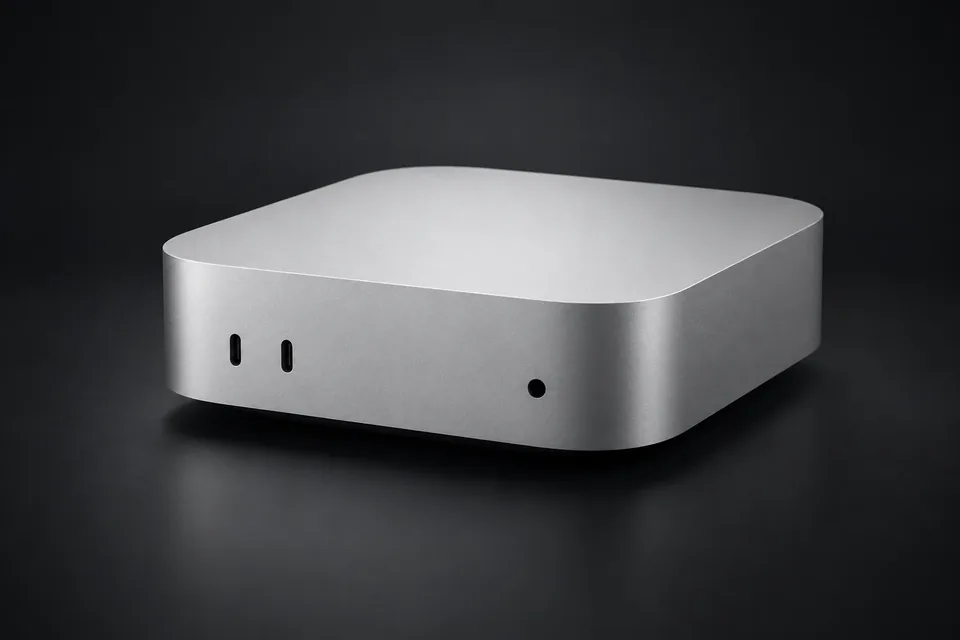
Mac mini
Product image, not a site photo

What you get

One named physical machine
Yours alone for the rental term, with a fixed ID. It is securely erased before anyone else gets it.
Network egress, pick one of three
Shared egress (default); a dedicated static public IPv4 (on enquiry); residential broadband (to be confirmed, costs more). Each is itemised on the quote.
What we don’t take on
Logging in to third-party AI or platform accounts on someone’s behalf; use as a general proxy or reselling remote desktops; demands for “never banned” or guaranteed platform decisions. Each use is checked against Apple’s software licence, order by order.

How we build it

Rack, network isolation and security process. The diagram below is a design illustration, not a photo of a finished site.

Rack: our rack design (illustration)

An open rack. The 4 registered Mac minis each sit on a numbered tray. The site is still being negotiated; this is a design, not a finished facility.

  • Mac mini traysNumbered from QIE-M01, one Mac per tray
  • Managed switchOne port maps to one machine
  • UPSSafe shutdown on power loss, with regular shutdown drills
  • CablingCables bundled and fixed in place

Network isolation: every machine gets its own lane

  • One VLAN per machineTenants deny each other; inbound from the internet is denied by default
  • Three egress types, kept apartShared egress, dedicated static IPv4, residential broadband; if we detect CGNAT we don’t pass it off as a dedicated public IP
  • Management over a controlled VPNNo SSH, VNC or RDP open to the internet
  • Backup line is for operations onlyWe never swap a customer’s egress quietly; an IP change is announced and agreed first
  • Checked machine by machineIPv4 and IPv6 both tested; egress IP re-checked per machine after a reconnect

Security: written as process, not promises

  • AccountsThe network lead uses a separate account with MFA; actions go into tickets
  • MonitoringGateway, main line and devices checked every 60 seconds; no customer content is collected
  • HandoverTemporary credentials are delivered by a separate channel; a change is forced at first login
  • DisksFileVault and safe shutdown are rehearsed regularly
  • OffboardingWe remind you to back up and sign out of your Apple ID; at expiry VPN, remote tokens and keys are revoked, and the Mac is securely erased before reuse
  • IsolationSuspected cross-tenant access is isolated immediately; internal reports use anonymised totals only, with no customer accounts or remote passwords

Faults are handled in three bands: 0–15 minutes, 15–30 minutes, and over 30 minutes. We first tell you the impact and when the next update is due. These are internal drill targets, not an SLA and not a certification.

How to start renting a Sydney Mac

  1. 01

    Create an account

    Sign up with your email. Google sign-in is coming later.

  2. 02

    Submit a request in your account

    Pick a configuration, a start date and a network egress option.

  3. 03

    Get a quote in A$

    We quote against your request. Nothing is charged automatically.

  4. 04

    Transfer, get your Mac

    Once we confirm the payment by hand, we assign a machine. Your account shows its status and expiry date.

Want to try 7 days first? Pilot fees and refund terms are confirmed in writing before you start.

Before we sell, we test the route

Measured continuously from 19:00 to 23:00 Beijing time. These are our internal pass marks, not a customer commitment. Until your network has been tested, it stays marked “cross-border unverified”.

Your computerMainland China · cross-border unverified
Your Mac miniSydney

Illustration, not a live measurement

Evening-peak internal pass marks

Latency (p95)
≤ 220ms
Jitter
≤ 25ms
Packet loss
≤ 1%
Reconnect after a drop
≤ 120s

Common questions

Where exactly are the machines?

In Sydney. The exact rack space is fixed only after the site signs a written permission; we don’t make up an address in advance. Customers never need to visit.

How many are there now? When can I use one?

Four are registered: two M4 16GB, one M4 24GB and one M6 16GB. Which one is free is confirmed when you apply. The first batch of additional machines is bought only after the pilot passes.

Can I get a fixed IP?

Yes, on enquiry. A dedicated public IPv4 depends on how many addresses the line can allocate; once confirmed it goes on the quote. Shared egress is stated as shared with other devices.

For site owners with rack space · Sydney Mac node

Lend us one lockable shelf and try it for 7 days

We start with 1–2 Mac minis and grow to at most 6 after the pilot passes. They run 24 hours a day, and no customers ever visit.

Target price, space onlyA$120/mo

All-inclusive quotes (power and internet included) are compared separately. Preferred areas: Silverwater and Auburn; we also look at Lidcombe and Rydalmere.

Five things we need the site to confirm

  • Written permission to host third-party equipment
  • Insurance: who is liable if something goes wrong, in writing
  • Wired fibre connection
  • Authorised maintenance staff can enter outside business hours
  • How removal works, agreed in advance

Want to ask first?

Search WeChat for Melpcast, or email customersupport@qiestudio.au.

Sign up for a Sydney Mac